.svg)

In the United States, Congress recently passed the Bipartisan Infrastructure Deal, which is the...
How to Choose the Best Traffic Control Plan Software: A Buyer's Guide
TL;DR: The best traffic control plan (TCP) software depends on the type of plans your team creates, how often you create them, who needs to review them, and what regional requirements you need to follow. Look for TCP software with traffic control plan templates, local sign and device libraries, integrated mapping, easy editing tools, collaboration features, professional export options, and support for your team’s planning workflow.
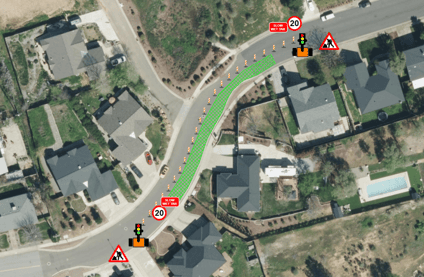
For traffic planners, traffic control designers, government agencies, road authorities, consultants, project managers, contractors, utilities, and engineering teams, a good traffic control plan needs to do more than show a temporary work area. It needs to communicate the layout clearly, support review and approval, and help everyone understand how vehicles, pedestrians, cyclists, workers, and equipment will move through or around the site.
That can become time-consuming when teams are working with manual drafting tools, repeated edits, changing site conditions, or different regional requirements.
The right traffic control plan software can make that process easier. It can reduce manual drafting and editing, improve consistency across plans, support clearer reviews, and help teams create professional outputs more efficiently.
CAD tools still have an important place in broader engineering design. But for teams that regularly create temporary traffic control plans, traffic management plans, lane closure diagrams, detours, road closures, and work zone layouts, dedicated traffic control plan software is often a more practical and efficient choice
In this guide, we’ll cover what to look for in TCP software, when dedicated software may be a better fit than CAD, and how RapidPlan and RapidPlan Online support different traffic control planning workflows.
1. What is traffic control plan software?
Traffic control plan software, also called TCP software or traffic management plan software, helps teams create drawings that show how traffic will move through or around a temporary work area.
These plans may be used for:
- Road work and lane closures
- Utility work
- Construction projects
- Road closures and detours
- Highway maintenance
- Special events
- Site access planning
- Pedestrian and cyclist route changes
Instead of drawing every sign, cone, road layout, and detour manually, traffic control plan software gives users tools built specifically for temporary traffic control planning. This can help teams create clearer plans, reduce repetitive drafting, update drawings faster, and manage revisions more efficiently.
2. Why does choosing the right TCP software matter?
Traffic control plans need to be clear, actionable, and aligned with local requirements. A plan that is hard to read or slow to update can create extra back-and-forth between designers, contractors, reviewers, approving authorities, and field crews.
The right TCP software can help teams:
- Create traffic control plans faster
- Improve plan consistency
- Reduce manual drafting
- Use local signs, devices, and templates where available
- Update plans more easily
- Share clearer outputs with reviewers and crews
- Support better communication across projects
Not every team needs the same solution. A small contractor creating occasional plans may need a different workflow from a road authority, engineering firm, utility provider, or traffic control company producing plans every day. That’s why it helps to compare software based on your actual planning needs, not just the number of features listed on a product page.
3. What to look for in traffic control plan software?
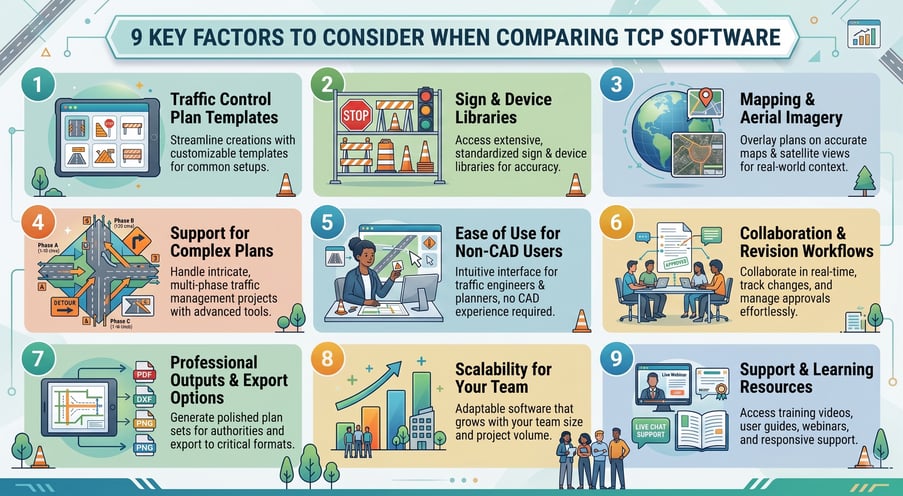
3.1 Traffic control plan templates
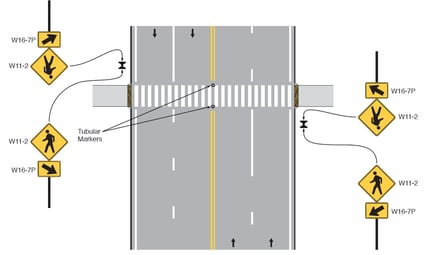
Templates can save time and help teams build more consistent plans. Look for software that includes templates for common scenarios such as:
- Lane closures
- Road closures
- Utility works
- Highway maintenance
- Construction projects
- Special events
- Detours
Tip: A good template should be easy to adapt to the actual site and support the planning process rather than replace site-specific review. The best TCP software should also let you customize templates for multiple use cases, reuse them across projects, and update them quickly as site conditions or requirements change.
3.2 Road sign and device libraries
Traffic control plans rely on clear symbols, signs, and temporary traffic control devices. These elements often need to reflect national and local standards, road authority expectations, and regional traffic control practices. Clear signage is one of the most important parts of a traffic control plan. The right software should make it easy to find, place, and update the signs and temporary traffic control devices needed for each site. This is especially important for organizations working across different cities, states, regions, or approving authorities.
Look for TCP software that includes libraries for:
- Road signs
- Warning signs
- Regulatory signs
- Traffic control devices
- Channelizing devices
- Cones and barricades
- Temporary traffic control equipment
Tips: A quality TCP software platform should make it easier to work with relevant signs, devices, symbols, and plan conventions. This can reduce manual efforts and help teams produce clearer, more compliant plans for review.
3.3 Mapping and aerial imagery
Traffic control plans are easier to understand when they are built on an accurate site context.
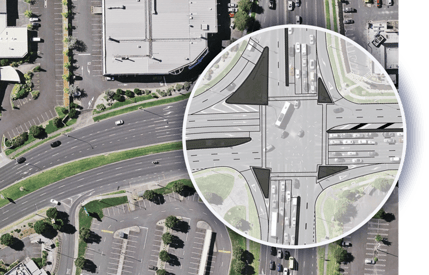
Look for software that allows users to draw over mapping, aerial imagery, or imported site files. This can help planners show lane closures, access points, work areas, detours, and device placement more clearly.
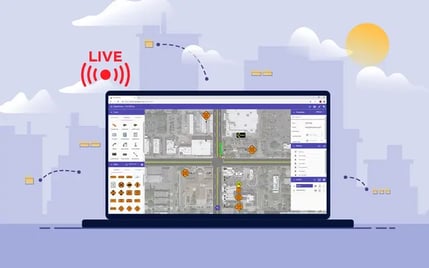
For example, RapidPlan supports integrated mapping and allows external mapping or image sources to be imported. RapidPlan Online allows users to draw traffic control plans directly onto Google Maps, Mapbox, or aerial imagery through a web browser.
Before submitting or implementing a traffic control plan, review it carefully.
- Required signs and traffic control devices
- Correct spacing, tapers, and buffer areas
- Clear work area limits
- Detour or closure details where needed
- Pedestrian and cyclist accommodations
- Emergency access requirements
- Flagger or temporary signal locations
- Notes required by the road authority or approving agency
- Construction staging or phase details
- Clear labels, legends, and measurements
For larger projects, the review process may involve traffic designers, civil engineers, project managers, contractors, municipalities, utilities, and transportation agencies.
Tip: A clear review process can help reduce back-and-forth, avoid missing details, and improve the quality of the plan before it reaches the field.
3.4 Support for more than basic lane closures
Plan complexity can also depend on traffic volume, road type, worksite location, and the number of road users affected. Higher-volume roads may require more detailed layouts, clearer staging, and stronger review workflows. Some projects need more than a simple lane closure diagram.
Look for software that can support:
- Temporary traffic control plans
- Traffic management plans
- Detour route planning
- Work zone layouts
- Construction staging
- Intersection planning
- Pedestrian and cyclist accommodations
- Site access planning
This is especially important for teams managing different project types or working across multiple authorities. If your team regularly prepares plans for different jobs, sites, or clients, choose software that can support repeatable workflows without limiting you to basic layouts.
3.5 Ease of use for non-CAD users
Many traffic planners, contractors, project managers, and public works teams are not CAD specialists.
The best traffic control plan software should make it easier to create professional plans without advanced CAD training. Look for intuitive drawing tools, drag-and-drop plan elements, templates, mapping, and simple editing features that help users build, revise, and share plans more efficiently.
For many teams, the right TCP software should support a straightforward workflow that minimizes manual efforts and makes plan creation more accessible for occasional users as well as regular planners.
3.6 Team Collaboration
Traffic control plans often require input from multiple stakeholders. Planners, designers, engineers, contractors, project managers, clients, and approving authorities may all need to review or comment on a plan.
Consider whether the software supports:
- Team collaboration
- Cloud-based sharing
- Plan reviews
- Revision workflows
- Professional exports
- Searchable plan storage
- Access across different locations
For teams managing multiple jobs, a searchable plan library or project dashboard can make it easier to track plans, find current versions, and keep work organized across projects, locations, and users. Good traffic coordination depends on keeping planners, contractors, reviewers, field crews, and approving authorities aligned. Collaboration tools can help teams share plans, collect comments, manage revisions, and reduce confusion across the project. This is especially useful for distributed teams, public works departments, traffic control companies, and contractors managing several jobs at once.
3.7 Professional output and export options
A traffic control plan needs to be easy to review, approve, and use in the field.
Look for software that helps produce clear plan sets with readable labels, legends, notes, and flexible export options. For teams working with engineers or larger design files, CAD compatibility may be important, while PDF and common image formats can make plans easier to share with clients, reviewers, contractors, and field crews.
The best TCP software should support importing and exporting a range of file types, including CAD-friendly formats such as DXF and DWG, as well as PDFs, SVGs, and common image formats. This can help teams work more easily across different workflows, stakeholders, and approval processes.
3.8 Scalability for your team
Your planning needs may change as your organization grows.
An independent consultant may need a fast way to create professional plans. A contractor may need repeatable workflows across multiple jobs. A road authority or larger traffic control company may need consistent outputs, multiple users, easier revision management, and stronger coordination across teams.
It is also worth considering pricing, contract terms, and licensing flexibility. The best TCP software should fit your current budget and workflow while giving you options to scale usage, add users, or adjust access as your needs change.
Choose software that supports your current workflow but can also grow with your team without adding unnecessary complexity.
3.9 Support and learning resources
Even well-designed software takes time to learn.
Look for TCP software with onboarding, training materials, help documentation, and tutorials. These resources can make it easier for teams to get started and continue improving over time.
It is also worth considering whether the provider offers access to a responsive support team, a dedicated account manager, or both. This can be especially important for teams adopting new workflows, training new users, or working on time-sensitive projects.
4. CAD tools vs. traffic control plan software
Both CAD tools and dedicated traffic control plan software can be used to create traffic control plans. The right choice depends on the type of work, the level of detail required, and how your team prepares and reviews plans.
CAD tool
CAD platforms are commonly used for broader engineering, civil design, and infrastructure projects. They offer strong drafting flexibility and can be useful when a traffic control plan needs to be included as part of a larger design package.

Benefits of CAD tools:
- Highly customizable drafting environment
- Useful for detailed engineering design
- Suitable for large infrastructure and civil design packages
- Familiar to engineering and design teams already working in CAD
Challenges of CAD tools:
- Traffic control plans can take longer to produce
- Signs, devices, and plan elements often need to be placed manually
- Traffic-specific tools may be limited without extra libraries or setup
- Non-CAD users may face a steeper learning curve
- Revisions and repeat plans can require more manual work
CAD tools can be a good fit when traffic control drawings need to sit within a wider engineering workflow. However, they may not be the most efficient option for teams that need to create temporary traffic control plans quickly and repeatedly.
Dedicated traffic control plan software
Dedicated traffic control plan software is built specifically for temporary traffic control and traffic management planning workflows.
Benefits of dedicated TCP software:
- Faster traffic control plan creation
- Built-in templates and traffic-specific tools
- Road sign and traffic control device libraries
- Integrated mapping and aerial imagery
- Easier lane closure and detour planning
- More efficient revisions and updates
- Better support for repeat planning workflows
- Easier adoption for non-CAD users
Dedicated traffic control plan software is often the better fit for organizations that regularly prepare traffic control plans and need speed, consistency, and practical outputs that are easy to review, update, and use in the field.
5. How do RapidPlan and RapidPlan Online support traffic control planning?
RapidPlan and RapidPlan Online are built for traffic control planning. Whether your team needs a full-featured desktop solution for frequent plan production or a browser-based option for flexible, collaborative planning, both tools help reduce manual drafting and support clearer traffic control plan outputs. Explore RapidPlan and RapidPlan Online to find the workflow that fits your team.

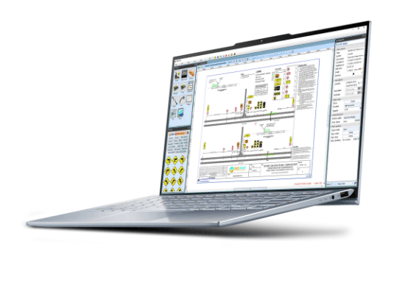
RapidPlan is a desktop traffic control plan software designed for teams that create traffic control plans regularly or work on more detailed projects. It includes tools such as automatic road layouts, sign and device libraries, integrated mapping, customizable templates, team collaboration, CAD compatibility, and an automatic intersection creator. RapidPlan is a strong fit for teams that need a more complete desktop workflow for frequent plan production and complex traffic control designs.
RapidPlan Online is a web-based traffic control plan application designed for teams that want to create plans through a browser. Users can draw traffic control plans directly onto Google Maps, Mapbox, or aerial imagery, with access to specialized drawing tools, local sign libraries, integrated mapping, searchable plan libraries, live team collaboration, and real-time location data. RapidPlan Online is well-suited to teams that need a flexible, easy-to-access option for low-to-medium complexity plans, occasional projects, or collaborative online workflows.
6. FAQs
1. What is traffic control plan software?
Traffic control plan software helps users create drawings that show how traffic will be managed through or around a temporary work area. It is used for roadworks, construction sites, utility works, detours, lane closures, special events, and other temporary traffic management needs.
2. What is the difference between TCP software and TMP software?
The terms can vary by region. TCP software usually refers to software used to create traffic control plans. In some countries, similar plans may be called traffic management plans, or TMPs. The purpose is similar: to show how traffic, pedestrians, cyclists, workers, and site access will be managed during temporary works.
3. Is traffic control plan software useful for non-CAD users?
Yes. Many traffic planners, contractors, public works teams, and project managers need to create or review plans without advanced CAD training. Dedicated TCP software can make plan creation more accessible through templates, drag-and-drop tools, mapping, and traffic-specific libraries.
4. Is CAD software enough for traffic control plans?
CAD software can be used to create traffic control plans, especially when the plan is part of a larger engineering design package. However, dedicated traffic control plan software is often faster and easier for teams that regularly produce TCPs, because it includes traffic-specific tools, templates, signs, devices, and mapping features.
5. What should I look for in traffic control plan software?
Look for templates, local sign and device libraries, mapping tools, easy editing, collaboration features, professional export options, and support for the type of traffic control plans your team creates most often.
6. What is the difference between RapidPlan and RapidPlan Online?
RapidPlan is a desktop application suited to full-featured traffic control plan production. RapidPlan Online is a web-based application suited to browser-based plan creation, collaboration, and low-to-medium complexity traffic control plans.
Editor’s note: This post was originally published in August 2026 by Invarion.